1
110 Phone management
After the update, the instructions in the user guide may no longer be up to date.
Update phone software and applications using your phone
You can check if there are updates available for your phone software or for
individual applications, and then download and install them to your phone (network
service). You can also set your phone to automatically check for updates and notify you
when important or recommended updates are available.
Select Menu > Applications > SW update.
If there are available updates, select which updates to download and install, and select
.
Set your phone to automatically check for updates
Select Options > Settings > Auto-check for updates.
Update phone software using your PC
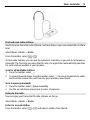
You can use the Nokia Ovi Suite PC application to update your phone software. You need
a compatible PC, a high-speed internet connection, and a compatible USB data cable to
connect your phone to the PC.
To get more information and to download the Nokia Ovi Suite application, go to
www.ovi.com/suite.
Manage files
About the file manager
Select Menu > Office > File mgr..
You can browse, manage, and open files on your phone. You can also view and manage
files on a compatible inserted memory card.
View the files stored in your phone
Select Menu > Office > File mgr. and the desired memory.
The files and folders at the top level of that memory location are displayed.
View the contents of a folder
Select the folder.