1
 Visual Schedule Planner
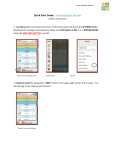
Note: Tap “Save” before returning to the home screen to ensure all changes are saved.
Edit Event Screen
4. Additional Features (for expanded info, please refer to individual tutorials):
● Notes
● Activity Schedules
● Libraries
Notes
Activity Schedules
Libraries (Images, Videos, & Sound)
5. From the SETTINGS Menu, you can
● Hide buttons (if needed) - NOTE: To access Activity Schedules and Video Library independent of an event the
you must slide the EDIT BUTTON to HIDE.
● Set Password
● Create & Restore from iCloud backup
● Archive app data using iTunes FILESHARING
● Print out daily calendar (send via email)
● Edit labels for “Now” and “Next”
● Add Multiple Users (Admin is the default user)