1
1PoWerⅡ ne∶ support12~24VAC/12VDC
2.1Insta"the Bracket
2RJ45interface Connection cable(4丨 ines W th p n〉
3Lock Relay connection cab e(2|ines with pin〉
1.Preface
(Optj° na丨 ,f your Vers on supports this funCtion)
44pcslR LED ns de
Thank you for using the W卜 Fi Doorbe" Thisis the new smart home wⅡ
eless
doorbe" It supp° rls two、 ˇ
ay audio,motion detection,snapshots、
recording and
more P|ease take a minute to carefu"y Γ
eview1hese instructions
6Microphone
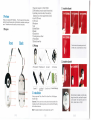
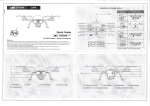
1,1Diagram
8Doorbe"B utton
525mm Lens
7Logo
9speaker
10BraGket Ho丨 e
11Coo丨 ing Aluminum sheet
Front
12Reset Button
13Bottom screW Hole
1.2Package
、
Ⅵ√Fi Doorbe"X1 RF Be"Receˇ er X1
Brack⒍ X1
\◇
x1 sCrew Dhver X1sC岭
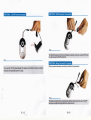
2.2Insta"the Doorbe"
Ws&Rubberp ug
谘 卧 J、 皙γ
2.InstaHation
Tools you may need∶ P"ers,Power Dr"or screw Driver,VVire strippers,
丨
nsu|ation Tape
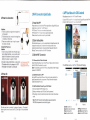
statemen⒈ D冖
ion thatthe doorbe"w"|be
"tWo screW
ho pesug
on in$de,punch
the pos吐
insta ed,and putthe
rubber
a sma|ho e forthread ng
a"the cab{esin advance
Note:The samp|e nsta"aton s onthe Wooden door‘
just FY丨
A负 er the bracket is insta"ed, put aⅡ
the cab|es
1hrough the sma"hole, and insta"the doorbe"
on the bracket
bottom, p丨
Then insta" 1he screw a【
ease make $ure irs1ight
the