1
Litebase User manual
•
Uarea:
this class (derived from Rbuf) provides access to the table’s u-area.
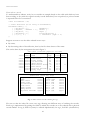
These classes are shown on Fig. 2.
Rbuf
datafile
fields
field
load
flush
discard
clear
setserialflag
getserialflag
lock
unlock
buf
bufsize
DataFile
open
create
insert_field
delete_field
change_field
rcount
delrecs
serial
fragmentation
fields
ufields
tags
setserialcounter
setpagesize
pack
import_csv
hlock
ilock
dbase_ext
opened
Uarea
Rlist
bind
append
top
go
seek
tagno
tagname
tagtext
tags
mkkey
ilock
hlock
setautolockmode
getautolockmode
Field
type
name
text
aslong
asdouble
btol
btof
ltob
ftob
changed
isnumeric
size
select
del
bottom
skip
skipcount
isdeleted
recno
taglen
rcount
cmpkeys
iunlock
hunlock
losecur
positioned
close
move_field
insert_tag
delete_tag
change_tag
created
valrecs
idxchg
namelen
fieldnode
ufieldnode
tagnode
dbname
getpagesize
reindex
export_csv
hunlock
iunlock
index_ext
len
clear
fptr
asint
set
btos
btod
stob
dtob
set_changed
isttypevalid
Fig. 2 – Litebase class hierarchy.
Each box represents a class, with its name in bold followed by a list of its member functions. Arrows
represent derivation (the arrow pointing to the derived class). Derived classes can access the member
functions of their base class; for example, an Rlist can call Rbuf’s method field.
Physical access to a data table
This section deals with physical access to the contents of a data table.
Creating a data table
As was said above, the DataFile class is Litebase’s interface to a table’s physical files. To create a
DataFile, all we have to do is call DataFile::create (a static member function).
#include <stdio.h>
#include "datafile.h"
// for printf
// for DataFile class
int main()
{
int rc = DataFile::create("mytable");
3