1
Destination MATH PC User Manual Version 3.1 © 1999/2000 Riverdeep Inc. See ‘‘Notices’’.
4.1.2.7 Print a graph file
Use the following procedure to print a graph file:
1 Open the required graph for printing.
2 Click File>Print.
OR
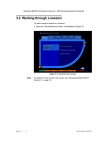
Press <Alt+f+p>. This will open the Print options dialog, as illustrated
in Figure 114.
Figure 114 Print options dialog
Note:
Gr aphi ng To o l
The print dialog shown is a sample dialog only. The printer driver software
on the system will determine the layout of the print dialog displayed on
your screen. Please check with the system administrator for details on the
displayed print dialog and the print procedure on your system.
Page 4 - 29