1
Application Note 1165
Send Challenge
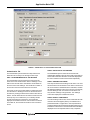
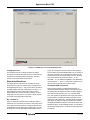
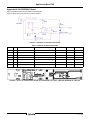
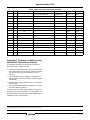
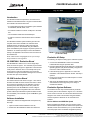
FIGURE 7. SCREEN SHOT OF THE AUTHENTICATION TAB
Authentication Tab
STEP 2: SELECTION OF THE SECRETS
The authentication process takes four steps and this tab
allows the user to easily move through the four steps.
The ISL6296 has space for three sets of secret and the
authentication algorithm uses one for the Hash engine and one
as the seed for the CRC calculator. The second step requires
the user to select the secret for each function respectively.
STEP 1: SYNCHRONIZATION OF THE SECRETS
The authentication process requires the same secret be
stored in the host and the device. When a challenge is sent,
both the host and the device calculate the results based on
the same secret and challenge. The results will not match if
the secrets in the host and the device do not match.
The secret can be synchronized either by reading the secret
from the device or sending the secret on the host screen to
the device by clicking the Read Secret and the Send Secret
buttons. This tab allows the user to read the secrets from the
device (if they are not locked out) or to manually edit the
secrets and send them to the device. The secrets are
displayed in hexadecimal format. If the secrets in the device
are locked out, the host will not be able to read or send the
secret.
3
STEP 3: SENDING CHALLENGE
This step sends the 32-bit challenge to the device. The host
will first send the secret selection to the device to ensure that
the correct seed is re-loaded before the calculation, and then
the displayed challenge code is sent. The user can manually
edit the challenge code. The Random Code button is for
easy random challenge code generation. The challenge
code is also displayed in hexadecimal format.
STEP 4: RESULT COMPARISON
Once the challenge code is sent, the PC reads back the hash
result from the result register (AUTH). The software has a
powerful FlexiHash™ engine built in. The Expected Result
cell always displays the expected result instantly based on the
information on the screen. The result read from the ISL6296 is
displayed next to the expected result for easy comparison.
AN1165.1
July 14, 2009