1
7.14 Karaoke filter
The Karaoke filter filters the human voice out of audio files, so that the original
song can be saved without the vocals. The filter removes those parts of the
song which are the same in both stereo channels. This is generally the vocals.
Because of the way in which the filter works, the original file must be a stereo
file. Also, there is no guarantee that the voice can be removed successfully. The
success of the filtering depends on the mixing during the production of the
recording.
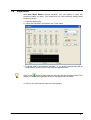
1. Choose 'Karaoke Filter' from the 'Tools' menu.
2. Determine the position of the vocals in the stereo field by turning the 'Vocal
Pan' knob.
3. Turn the knobs in the 'Vocal Frequency Band' area to specify the upper and
lower limits of the frequency range within which the filter will work.
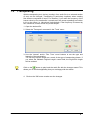
Clicking on the
button plays the audio file with the specified changes. This
allows you to check immediately whether you are happy with the results.
4. Click on the 'OK' button to accept the changes.
Nero Wave Editor
Effects • 45