1
FreeWave Technologies
900MHz, 2.4GHz, and 1.4GHz Spread Spectrum Modem
Multipoint Diagnostics Manual V 2.16D
Table of Contents
1
2
3
4
5
6
7
Introduction ............................................................................................................................................ 4
Hardware set-up...................................................................................................................................... 5
2.1
Diagnostics Computer .................................................................................................................... 5
2.2
Accessing the FreeWave Network.................................................................................................. 5
2.2.1
Direct access through the Diagnostics Port (FGR series Master) ........................................... 5
2.2.2
Direct access through an Ethernet network ............................................................................ 6
2.2.3
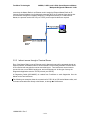
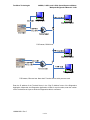
Indirect access through a Terminal Server.............................................................................. 7
2.3
Limitations...................................................................................................................................... 9
Radio set-up.......................................................................................................................................... 10
3.1
Set-up the Master.......................................................................................................................... 10
3.1.1
Invoke the Set-Up mode ....................................................................................................... 10
3.1.2
Ensure that the packet is big enough .................................................................................... 10
3.1.3
Set the Diagnostics rate ........................................................................................................ 11
3.1.4
Assign an IP address............................................................................................................. 12
3.2
Set up the other radios in the network .......................................................................................... 12
Communications set-up with the Master .............................................................................................. 13
4.1
Direct access through Serial Ports ................................................................................................ 13
4.2
Direct access through an Ethernet network .................................................................................. 15
4.3
Indirect access through a Terminal Server ................................................................................... 16
Managing the Network List.................................................................................................................. 19
5.1
Adding radios to the list................................................................................................................ 19
5.1.1
Adding a radio automatically................................................................................................ 19
5.1.2
Adding a radio manually ...................................................................................................... 19
5.1.3
Retrieving a Network List .................................................................................................... 20
5.2
Editing a radio's name................................................................................................................... 21
5.3
Deleting a radio ............................................................................................................................ 21
5.4
Saving the Network List ............................................................................................................... 22
Gathering and saving Data ................................................................................................................... 23
6.1
Polling method.............................................................................................................................. 23
6.1.1
Random Polling .................................................................................................................... 23
6.1.2
Sequential Polling................................................................................................................. 23
6.1.3
Manual Polling ..................................................................................................................... 23
6.2
Saving data ................................................................................................................................... 24
6.2.1
Generating a Diagnostics Log .............................................................................................. 24
6.2.2
Saving Radio Settings and plot data ..................................................................................... 25
Interpreting the Data............................................................................................................................. 27
7.1
Identifying Radios ........................................................................................................................ 27
7.2
Selecting display preferences ....................................................................................................... 28
7.2.1
Displaying Radio Serial Numbers or Names ........................................................................ 29
7.2.2
Selecting Signal Units........................................................................................................... 30
7.2.3
Selecting Imperial ("American") Or Metric Units ................................................................ 31
7.3
Reading Screen 0 .......................................................................................................................... 32
7.3.1
Network file.......................................................................................................................... 32
7.3.2
System Clock........................................................................................................................ 32
7.3.3
Master Radio line.................................................................................................................. 32
7.3.4
List of radios......................................................................................................................... 33
7.3.5
Scroll bars............................................................................................................................. 33
7.3.6
Radio's Serial Number or Name ("Radio")........................................................................... 34
7.3.7
Radio's function ("Fn") ......................................................................................................... 34
7.3.8
Radio link signal strength ("Sig")......................................................................................... 35
7.3.9
Radio link noise level ("Nse") .............................................................................................. 35
7.3.10 Receive success rate ("%") ................................................................................................... 36
7.3.11 Radio frequency error ("Freq ppm")..................................................................................... 36
7.3.12 Bytes transmitted ("DATA bytes")....................................................................................... 37
LUM0003AB Rev C
2 of 63