1
Installation
Remove all packing materials from the ER-1193. Check that all foam and plastic padding is removed. Put
the 2 antennas into socket A and B at the backside in a vertical angle.
Always disconnect from electric mains power supply before cleaning or servicing.
Damages caused by non-observance are not subject to warranty.
Set Up and Operation
Before plugging the unit in, always make sure that the power supply matches the product specification
voltage. Do not attempt to operate a 120V specification product on 230V power, or vice versa.
Press the powerswitch to turn the ER-1193 on.
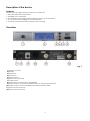
Fig. 4
13) A Receiving Channel Indicator
14) Mute Indicator
15) Audio Frequency Indicator
16) Signal Channel Indicator
17) RF Indicator
18) B Receiving Channel Indicator
MENU Options
1. Frequency
2. Scan
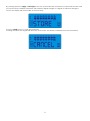
Frequency Set Menu
Press the set(4) button for 3 seconds, the LCD shows:
6