1
Chapter 2
Analog Input Timing/Control
2.6 Programming Information
Programming the DAQ-STC involves writing to and reading from the registers on the chip.
The programming instructions are language independent; that is, they instruct you to write a
value to a given bitfield or register or to detect the state of a bitfield or a register without
presenting the actual code.
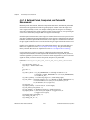
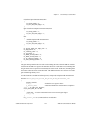
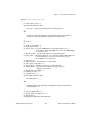
This section presents the functions required to implement some common analog input
applications, which are described in pseudocode that refers to the various bitfields. Bitfield
descriptions relevant to the AITM modules are also included. The bitfield descriptions are
intended to be used as a reference. See Appendix B, Register Information, for the DAQ-STC
register map and to locate specific bitfield descriptions in this manual.
A bitfield is a bit in a register, a group of functionally related bits in one register, or a pair of
registers that jointly perform a function. If a bitfield consists of several bits within one
register, the locations of the bits must be contiguous. Pairs of 16-bit registers are needed for
loading and saving the 24-bit counter contents. Each pair of registers is treated as a single
bitfield in this document.
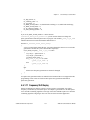
2.6.1 Register and Bitfield Programming Considerations
Several write-only registers on the DAQ-STC contain bitfields that control a number of
functionally independent parts of the chip. To follow the instructions for assigning values to
bitfields, you must set or clear bits without changing the current state of the remaining bits in
the register. However, writing to these registers affects all register bits. You cannot read these
registers to determine which bits have been set or cleared in the past; therefore, you should
maintain a software copy of the write-only registers. You can then use this software copy to
determine the status of write-only registers. Because some bitfields get cleared automatically,
you should keep your software copies current. To change the state of a single bitfield without
disturbing the remaining bits, perform the following steps:
1.
Make a secondary copy of the software copy.
2.
Clear the bitfield in the secondary copy.
3.
Place the new bitfield value in the secondary copy.
4.
Write the value of the secondary copy to the register.
5.
If the bitfield is not cleared automatically, update the software copy by replacing it with
secondary copy.
Bitfields that get cleared automatically are called strobe bits. To change the state of a bitfield
that spans over two registers, you need to write to both registers.
DAQ-STC Technical Reference Manual
2-24
© National Instruments Corporation