1
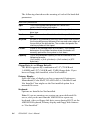
Check for and remove viruses. The boot sector and partition table
on your HDD may be damaged.
PROBLEM
CMOS setup loss
SOLUTION
Make sure that your application software does not write to CMOS
data addresses.
PROBLEM
System hangs after working for a short time (about 20 minutes)
SOLUTION
Make sure the power switch is set to correct input range (110 or 220
VAC). If the correct range is set, check the quality of the input
power. It should be stable and between 90 and 120/200 and
240 VAC. PC equipment should not be connected to the end of a
power trunk line. Next, check the output of the power supply. The
+5 VDC supply should be between 4.75 and 5.25 VDC.
Make sure the temperature of the case is less than 60oC (140oF). If
necessary, clean the air filter and backplane.
Check that the SIMM DRAM modules have an access time of
80 nsec or less.
PROBLEM
Serial Port Failure
SOLUTION
Check cable connections between the PC and the remote terminal
equipment. Make sure that the remote terminal equipment is
functioning properly.
Check COM port assignment.
When using standard C, Pascal or BASIC serial port commands,
make sure that either the port’s DTR/DSR and RTS/CTS lines are
looped back (shorted together in the connector), or the COM port
74
PCA-6134P User's Manual