1
Appendix
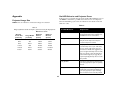
Red LED Behavior and Projector Errors
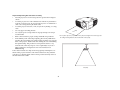
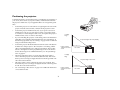
Projected Image Size
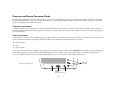
If the projector is not functioning properly and the LED is blinking red, consult Table 3 to determine a possible cause. There are two-second pauses
between the blinking cycles. Visit our website for more details on the red
LED error codes.
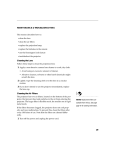
NOTE: Visit our website for an interactive image size calculator.
Table 3:
Table 2:
Range of distance to the screen for a given screen size for the projector
Distance to screen
Diagonal
Screen Size
(inches/m)
40/1
50/1.3
60/1.5
100/2.5
150/3.8
200/5.1
Image Width
(inches/m)
32/0.8
40/1
48/1.2
80/2
120/3.1
160/4.1
Maximum
distance
(feet/m)
5.8/1.8
7.8/2.4
8.8/2.7
14.6/4.5
22.6/6.9
30.5/9.3
Minimum
Distance
(feet/m)
4.8/1.5
6,5/2.0
7.5/2.3
12.4/3.8
19.03/5.8
25.2/7.7
45
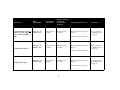
Red LED Behavior
Explanation
One (1) blink
The lamp won't strike after five (5)
attempts. Check the lamp and lamp door
installations for loose connections.
Two (2) blinks
The lamp counter hours have exceeded
lamp life hours. Replace the lamp and
reset the lamp hours counter.
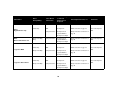
Three (3) blinks
The projector has shut down. Check to
see if the lamp door is open. If the lamp
door is closed, toggle off the projector
and wait one minute, then toggle the projector on again. If the lamp does not strike
after one minute, replace the lamp. Contact Technical Support (see page 29) for
repair if replacing the lamp does not solve
the problem.
Four (4) blinks
The fan has failed. Contact Technical Support (see page 29) for repair or replacing
the fan.
Five (5) blinks
The projector is overheating. Check for a
blocked air vent. Contact Technical Support (see page 29) for repair if clearing
the air vents does not solve the problem.