1
Installation and User Manual
Model: IPOD-DOCK-MBQ
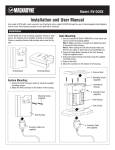
Adapters and Insert
Use the diagram below to choose the Adapter/Insert that fits your
IPOD. Identify the adapters by the labels on the back of the adapter
housing.
Inserting Adapter
Push the release lever,
then insert adapter
into housing
NANO (Gen 2)
Adapter
NANO (Gen 3)
Adapter
IPOD Classic
Adapter
Changing Adapter
Push the release lever,
then remove adapter
from housing
Insert with
ITOUCH
Side
Facing
Out
Insert with
IPHONE
Side
Facing
Out
Cover
Place insert toward
back of adapter.
Then insert ITOUCH
or IPHONE
IPOD Classic
Adapter
© Copyright 2008 MB Quart
Patent Pending
When not in use
place cover on dash
mounted docking
station to keep out
dirt and moisture.
IPOD Classic
Adapter
IPOD-DOCK-MBQ-INS Rev. A 10-31-07