1
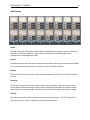
STEVEN SLATE - TRIGGER 2 16 * Values more than 50 set a posiVve non-‐linear response (which means if you trigger a sou hit on your drum track, it will be replaced by a hard hit from TRIGGER 2, or if you trigger the 64 velocity, TRIGGER 2 will transform it to, for instance, 80). * Values less than 50 set a negaVve non-‐linear response (which means if you trigger a hard hit on your drum track, it will be replaced by a sou hit from TRIGGER 2, or if you trigger the 64 velocity, TRIGGER 2 will transform it to, for instance, 40). So, using the Velocity control, you can adjust the response of TRIGGER 2 Instruments in any way you want. In other words, use this funcVon to set how light or aggressive you want your triggered drum tracks to sound in the mix. Range The Range controls allow the user to limit velociVes on an Instrument channel. Using the controls you can make TRIGGER 2 play, for instance, only Hard hits for Instrument channel (slot) one, and Sou or Medium hits on Instrument channel (slot) two. Curve Link The Curve Link secVon offers feature to selecVvely link either Acack, Sustain, Release, Dynamics, Velocity, or Range Min/Max controls for all Instrument channels (slots) control simultaneously. I.e. with Acack On, you may control all Acack parameters for the 8 channels via a single control. * With link engaged, the OperaVonal Key Commands for Parameter Reset and Fine Control are engaged/available.