1
B Burn/Coast Samp/sec. <4,5,8,10,15,20,25,33
<4,5,8,10,15,20,25,33>
,33>
This selects the number of samples per second that are written to the flight memory during the
Burn and Coast portions of the flight, which begins at Launch Detect and ends at nose-over.
This value is also used for the pre-launch sampling which occurs prior to Launch Detect, while
the rocket is either sitting on the pad or is approaching LDA. Values are 4,5,10, 15, 20, 25, and
33 samples per second.
Note that there is a finite amount of memory available for each flight, and using higher sample
rates will consume more memory and may not necessarily produce a more “accurate” flight
graph. In fact, if you have a rocket with a relatively low thrust-to-weight ratio, you are much
better with a lower sample rate, i.e. 4, 5, or 8 samples per second. If you have a mid-power
rocket with a thrust-to-weight ratio of 10+, a sample rate of 10, 15, or 20 will give you the best
graph. If you have a screamer with a 20+ thrust-to-weight ratio, then it’s OK to use 25 or 33,
and you will get the best mach-transition detection with those rates for such a beast (assuming
that it will go to Mach 1+…)
Be careful not set the sample rate too high. Besides wasting memory, the noise due to variations
in air pressure will be proportionately higher for smaller interval sizes. If you choose too high a
sample rate, you will most likely see a lot of noise in the velocity graph.
We recommend that you set this value equal to the average thrust/weight ratio of your rocket.
For example, if you have a rocket that weighs 18 oz, that’s 5N (3.6 oz = 1 N). If you are flying
on a G77 motor, the thrust/weight ration would be 77N/5N, or about 15/1. In this case, you
should use the 15 samples/second setting to produce a good graph and enough samples to
produce an accurate burnout detection.
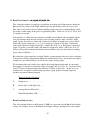
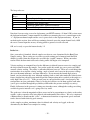
Thrust-to-Weight Calculation:
A
Weight in oz……………………….
B
Divide A by 3.6 (Weight in N).....…
C
Average thrust of Motor (N)..……..
Thrust/Weight Ratio (C/B)………..
Burn/Coast Interval (ms.)
This is the amount of time, in milliseconds (1/1000 sec.) represented by the Burn/Coast Sample
setting. For example, if you set the Burn/Coast Sample setting to 10 samples/sec, each sample
- 16 -