1
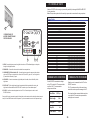
PARENTAL MENU
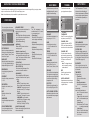
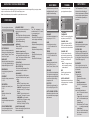
CAPTION
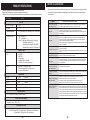
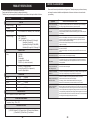
• [Analog Closed Caption]
Select an analog closed caption option. (CC 1-4 / TEXT 1-4)
• [Digital Closed Caption]
This function sets captions for digital programs and sets avail-
able languages.
• [Digital Caption Style]
Provides numerous options for setting the digital closed caption style in the sub-menu.
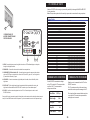
• Caption Style: Set to As
Broadcaster or Custom mode. If Custom mode is selected, user can modify the detail styles
described below. The setting result will be shown immediately
on the bottom of the submenu OSD.
Note: This feature is only available in Digital TV (ATSC) mode.
• Font Size: Selects this option to
choose a caption display size
according to your own prefer ence. Select “Small”, “Normal”,
or “Large”.• Font Style: Select
digital closed caption font style.
• Font Color: Choose the caption
display text color
• Font Opacity: Select the text
opacity.
• Background Color: Choose caption display character back-
ground color.
• Background Opacity: Choose one of the background opacity options.
• Window Color: Choose one of the display windows color.
• Window Opacity: Select one of the display windows color.
LOCATION
User has to key in the four
digit password
Parental
Menu before entering the Parental Control subUserParental
has to keyMenu
in the four digit
menu.
User
can modify
the
password
before
entering
thedigit
User has
to key
in the four
restricted
table
after entering
Parental
Control
sub-menu�
User
password
before
entering
the
Control
sub-menu�
can Parental
modify
the
restricted
tableUser
after
the parental
sub-menu.
While
can
modify
the
restricted
table
entering
the the
parental
sub-menu�
exiting
sub-menu,
theafter
entering
parental
sub-menu�
While
exitingthe
the
sub-menu,
theis
parental
control
function
While
exiting
the
sub-menu,
the
parental control function is activated�
activated.
parental
control function is activated�
EXIT
****
EXIT
Channel Block
Program Block
Input
Block
Channel
Block
Change Password
Program
Block
Clean All
Input Block
Change Password
Clean All
OK
EXIT
OK
EXIT
Select from Store or Home mode.
Store mode is recommended for
displaying in a retail showroom, and
Home mode is recommended for normal home use for Energy Saving.
English-24
VERSION INFO
English-24
Display the software information.
RESET
Restore all the default Setup settings.
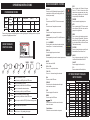
PROGRAM BLOCK
access
to specific
3� Control
Program
Block
programs based on the age and
Control access
3� Program
Block to specific
content
ratings.
Theonprogram
programs
based
the age and
Control
access
to specific
content
advisory
data
are
content
ratings�
The
programs
based on
theprogram
age and
provided
by
the
broadcaster.
contentratings�
advisory
are
content
Thedata
program
content
• [Rating
advisory
are
provided
byEnable]
thedata
broadcaster�
by thetobroadcaster�
provided
Set to “On”
[Rating
Enable]activate the
Enable]
[Rating
program
rating system.
Set to "On" to activate the
Set
•
[U.S.
TV
Ratings]
to
"On"
to
activate
the
program rating
system�
program
rating
system�
You set-top box or cable
[U.S.TV
TVRatings]
Ratings]
Video
[U.S.
receiver
box must be
Password
Video
****
Audio
You
set-topbox
box
cable
receiver
Audio
You
connected
through
RF
or AV
set-top
oror
cable
receiver
TV
box
must
be
connected
through
TV
box
must be connected
through
connectors
to
use
U.S
TV
Setup Setup
RF
orAV
AVconnectors
connectors
use
or
to to
use
U�SU�S
RF
ratings
function.
ParentalParental
TV
TV ratings
ratingsfunction�
function�
• [U.S. Movie Ratings]
USB USB
[U.S. Movie
Ratings]
Movie
Ratings]
[U.S.
Control
viewing
of movies
Control
viewing
of
movies
based
Back
Control
viewing
of
movies
based
based on the Motion
Picture
Back
on
the
Motion
Picture
Association
on
the
Motion
Picture
Association
of Association
of America
America (MPAA)
rating�
1�
Password
PASSWORD
of(MPAA)
Americarating.
(MPAA)
rating�
1� Password
[Canadian
English
Ratings]
Enter
the
password
to
access
Enter the
the password
password to
to access
access the
English
Ratings]
[Canadian
• [Canadian
English
Ratings]
Enter
the parental
sub menu�
Block the viewing movies by
parental
sub
menu.
the parental sub menu�
Canadian
Block
the
viewing
movies
Block
the
viewing
movies
English ratings� byby
Note: The default password Note:
Canadian
ratings�
Canadian
English
ratings.
Note:
• The default password is [0000]�
[Canadian English
French
Ratings]
• The
is default
[0000]. password is [0000]�
[Canadian
• [Canadian
French
Ratings]
French
Ratings]
Block the viewing
movies
by
Canadian
Block
the
viewing
movies
French
ratings�
Block
the
viewing
movies
byby
Video
Canadian
French
ratings.
Audio
Canadian
French ratings�
[Open
V-Chip]
Video
TV
Unlock
• [Open
V-Chip]
Audio
inhibitive channels or
[Open the
V-Chip]
Setup
source
Unlock
the inhibitive channels
TV
signals�
Parental
Unlock
the inhibitive
Setup
[Block
or source
signals. channels or
USB
sourceUnrated]
signals�
Parental
The
• [Block
Unrated]
unrated
program will be
USB
Enter
Select
Back
[Block
Unrated]
blocked�
The unrated program will be
2� Channel
Block
The unrated
Enter
Select
Back
4�blocked.
Input
Block program will be
Prevents children from watching
blocked�
DisableBLOCK
the specific external
2� Channel
certainBlock
channels�
INPUT
4�
Input
Block
input
source�
CHANNEL
BLOCK
Prevents
from watching
Disable the specific external input
Note: children
Disable Password
the specific external
5� Change
Prevents
children
from
watching
certain
channels�
• If you access the
blocked
source.
input
source�
Change the 4-digit parental
channel
from the number
certain
channels.
Note:
control
password�
buttons
on
the
remote
control,
5�
Change
Password
Note:
If youthe
access
the CHANGE
PASSWORD
• If you access
blocked
a
prompting
window
appears
6�
Clean
All
channel
blocked
channel
from the
Change
thethe
4-digit
parental
conChange
4-digit
parental
from
the
number
asking for the password�
allpassword�
the parental ratings to
control
buttons
number
on the
trolClean
password.
on buttons
the remote
control,
default setting�
window
appears
a prompting
remote control,
a prompting
6� Clean All
CLEAN
ALL
asking
for
the
password�
window appears asking for
Clean
all
parental
ratings
Clean
all
thethe
parental
ratings
toto
the password.
default setting�
default setting
Password
Tips
Tips
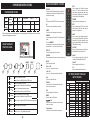
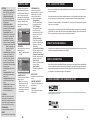
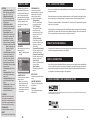
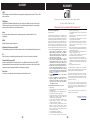
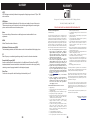
TIPS – CARE OF THE SCREEN
Do not rub or strike the screen with anything hard as this may scratch, mar, or even damage the
screen permanently .
Care Of The Screen
Never use ammonia or any cleaner containing ammonia, as it will damage the anti-glare coating
Do
rubOnly
or
strike
thealcohol
screen
with anything
hard
asthethis
may scratc
on thenot
screen.
use
Isopropyl
or an approved
screen cleaner
to clean
screen.
Care
Of
The
Screen
even damage the screen permanently� Unplug the power cord before
Protective covers are available for Cill all-weather TVs. Contact your Ciil representative to get the
Do
not
rub
orscreen.
strike
screen
anything
hard as
scratc
the
screen�
thethe
display
bywith
wiping
the screen
andthis
themay
cabinet
wi
right cover
for yourDust
even
permanently�
Unplug
the power
before
cleandamage
cloth� If the
the screen
screen requires
additional
cleaning,
usecord
a clean,
d
Unplug the power cord before cleaning the screen Dust the display by wiping the screen and the
the
screen�
Dust
the
display requires
by wiping
the
screen
and theofcabinet
wit
Do
not
cleaners,
cleaners,
orusesolvents
any kind�
cabinet
withuse
a soft,liquid
clean cloth
If the screenaerosol
additional
cleaning,
a clean, damp
cloth
clean
cloth�
If the screen
requires
additional
Do not use
liquid cleaners,
aerosol cleaners,
or solvents
of any kind. cleaning, use a clean, da
Do not use liquid cleaners, aerosol cleaners, or solvents of any kind�
Mobile Telephone Warning
MOBILE
TELEPHONE
WARNING away from your display to avoid disturb
Keep your
mobile telephone
Mobile
Telephone
Warning
the picture or sound, possibly causing permanent damage to your di
Keep your mobile telephone away from your display to avoid disturbances in the picture or sound,
Keep
your mobile telephone away from your display to avoid disturba
possibly causing permanent damage to your display.
the picture or sound, possibly causing permanent damage to your dis
End Of Life Directives
In an
to produce
environmentally friendly products, your new d
END
OFeffort
LIFE DIRECTIVES
End
Of
Life
Directives
contains materials that can be recycled and reused� At the end of you
In an
to produce
environmentally
friendly products, yourfriendly
new displayproducts,
materials
thatnew di
In
aneffort
effort
to produce
environmentally
your
life,
specialized
companies
can minimize
displaycontains
waste
by
separatin
can be recycled and reused. At the end of your displays life, specialized companies can minimize
contains
that
can
be recycled
and reused�
At the
end ofyou
you
reusable
materials
from
non-reusable
materials�
Please
ensure
display wastematerials
by
separating the
reusable
materials
from non-reusable
materials.
Please
ensure
you dispose
of your display
according to local
regulations.
life,
specialized
companies
can
minimize display waste by separating
your
display
according
to local
regulations�
reusable materials from non-reusable materials� Please ensure you d
your display according to local regulations�
LICENSE
AGREEMENT
TRADEMARK
NOTICEAcknowledgeme
License
NoticeAND
and
Trademark
the HDMI
logo and High-Definition
Multimedia Interface a
License Notice
and
Trademark
Acknowledgemen
® HDMI,
trademarks or registered trademarks of HDMI Licensing LLC in
States the
andHDMI
other logo
countries�
and High-Definition Multimedia Interface a
® HDMI,
® HDMI, the HDMI logo and High-Definition
Multimedia Interface are trademarks or registered trademarks of HDMI Licensing LLC
in the United States and other countries
trademarks or registered trademarks of HDMI Licensing LLC in t
Manufactured
under
license from Dolby Labortories� Dolby and t
States
and other
countries�
symbol are trademarks of Dolby Laboratories�
English-25
Manufactured
under license from Dolby Labortories� Dolby and th
symbol are trademarks of Dolby Laboratories�
English-25
Manufactured under license from Dolby Labortories Dolby and the double-D symbol are trademarks of Dolby Laboratories
TM
20
21