1
Installation
To start the installation:
With or without MetaStock running, double click setup.exe. This will initiate an
auto-install process that installs Templates, Experts, and DLLs in the following
locations:
C:\Program Files\Equis\MetaStock\Charts\Templates
C:\Program Files\Equis\MetaStock\\EXPERTS
C:\Program Files\Equis\MetaStock\External Function DLLs
Since the template is the master key that puts together all the pieces of the
trading system, it is suggested you make a backup copy of it at this point.
The custom indicators are also installed and can be viewed in the MetaStock
Formula Builder or Indicator Quicklist.
Once the install is complete, you are ready to apply the Market Reactivity System
in MetaStock.
Setup
Since the Market Reactivity System for MetaStock makes extensive use of
templates and layouts, it might be helpful to study the chapters covering them in
the MetaStock user manual.
This description here will use Wheat as an example. The procedure is the same for
any other instrument.
Start MetaStock and open a Wheat chart.
Right click on an empty part of the chart and select Apply Template from the
menu which opens an Apply Template dialog box. Check the Replace existing chart
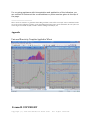
box. Select Wheat 1.mwt and click Open. This plots a Market Reactivity System 2page layout showing all the indicators and trade signals as shown in Wheat
Template in the Appendix.
If necessary, to scale the layout to fit your screen, go to Window menu and select
Column. If the page with the price plot flips over to the right side, save the layout
and then open the layout and go to Window Column command to flip the price plot
back to the left side. Save the layout this time as a Template, replacing the
original Template with the new scaled one and then save the layout. To save the
layout, go to File, Save As, and in the Save As dialog box, choose {Layout} for the
{Save as type}, and give the file a name and location. The Template is used only
once to initially create the layout. In the future, you will open the Wheat Layout
listed as Wheat.mwl to view the Wheat Market Reactivity Chart. The essential
information for trading is displayed on the price chart, including the ‘buy’ and ‘sell’
signals and the stop-loss points.