1
Introduction
This guide has the following chapters:
•
1 Handling Paper
Explains how choose, handle and load paper.
•
2 Using the Operator Panel
Explains how to use the operator panel to configure
the printer.
•
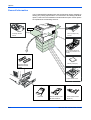
3 Options
Shows the available options.
•
4 Computer Interface
Describes the possible connections between the
printer and your computer.
•
Glossary
A Glossary of terms used is provided here.
ADVANCED OPERATION GUIDE
iii