1
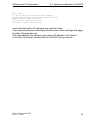
Entering the IP Parameters 2.5 System configuration via BOOTP switch_01:ht=ethernet:ha=008063086501:ip=149.218.112.83:tc=.global: switch_02:ht=ethernet:ha=008063086502:ip=149.218.112.84:tc=.global: . . Lines that start with a '#' character are comment lines. The lines under ".global:" make the configuration of several devices easier. With the template (tc) you allocate the global configuration data (tc=.global:) to each device . The direct allocation of hardware address and IP address occurs in the device lines (switch-0...). Enter one line for each device. After ha= enter the hardware address of the device. After ip= enter the IP address of the device. In the appendix under „Setting up DHCP/BOOTP server“ on page 178 you will find an example for the configuration of a BOOTP/DHCP server. Basic Configuration L2E Release 4.2 08/08 41