1
Column Expert v 2.7/2014
Design and detailing of reinforced concrete columns
User Manual
GRID
GR
HELP
Turn grid on and off.
Display user manual.
MIRROR
MI
Mirror the selected objects about a line defined by two points.
MOVE
M, MO
Move the selected objects along a vector defined by two points.
NEW
N
Create a new file.
OPEN
O
Open an existing file from the disk
ORTHO
OR
Turn orthogonal drafting mode on and off.
OSNAP
OS
Turn object snap mode on and off.
PRINT
PR, PRN
Send the current drawing to the printer.
REDO
RE
Restore the last command after UNDO.
REDRAW
RD
Redraw the screen view.
ROTATE
RO
Rotate the selected objects about a specified center point and angle.
RTPAN
PA, PAN
Move the screen view to other part of the drawing.
SAVE
S
Save the current data to a file on the disk.
SCALE
SC
Scale the selected object with specified center point and scale factor.
SCRIPT
Save a script file (*.scr) with AutoCAD commands needed to create the
current drawing in AutoCAD.
SELECTALL
A, ALL,
SELALL
Select all objects in the drawing that are not hidden or locked.
SNAP
SN
Turn snap to grid mode on and off.
UNDO
U
Undo the last command.
ZOOMIN
ZI, Z+
Zoom in the screen view by factor of 1.5.
ZOOMLIMITS
ZL, ZA, ZE
Zoom the screen view in order to fit all objects inside program window.
ZOOMOUT
ZO, Z-
Zoom out the screen view by factor of 0.5.
ZOOMWINDOW ZW
Zoom the screen view in order to fit inside the specified rectangle.
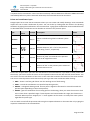
The following commands are available only in the cross section editor:
Command
Alias
Description
BAR
B
Draw main bars.
CHECK
Check design code requirements for the section.
LINK
L
Draw shear links.
OPTIONS
OP, OPT
Display settings dialog.
SECTION
SE, SEC
Draw section with the mouse.
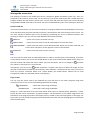
Undo wrong action or command
Click the
button or type the UNDO command.
It cancels the results from the last command and recovers the previous drawing state. You can undo only one
step back. If you need to go back further, use the other commands to recover the original drawing state.
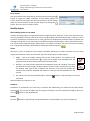
Redo a command that has been undone
Click the
button or type the REDO command.
Page 21 of 26