1
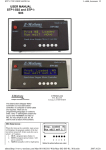
25. Setting Imprinter numbering
1) Press
(Next button) or
(Previous button) and let LCD display
<Screen25>.
<Screen25>
!
=
HINT
2
5
N
O
u
n
m
/
b
O
e
f
r
f
i
(
n
x
g
x
x
x
)
To show your selection of imprinter or the imprinter to setup, [Pre] or [Post]
is displayed.
(Left
Press
(Enter button) to confirm the selection. Then <Screen25-1> is
displayed.
If numbering printing is not required, press
[Off]. Then press
(Right arrow button) and select
(Enter button) to confirm.
<Screen25-1>
!
=
2
5
-
1
D
5
i
/
g
i
8
t
s
The blinking item is the one selected.
HINT
7.3 Setup Mode Details 7-55
OPERATOR PANEL MENUS
2) At <Screen25>, to enable numbering printing with the imprinter, press
arrow button) and select [On].
7