1
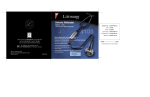
Quick Reference
Rhythm :ds32a
See Over for Getting Started guide
Amplify - Amplification On/Off
Display
Amplify Mode (Blue)
LED On - Amplified - Volume is Adjustable
LED Off - Acoustic - Volume is Pre-Set
Bell Mode
(Green)
Diaphragm Mode
(Green)
Click to alternate between volume-adjustable Amplified mode
and pre-set Acoustic mode similar to an acoustic stethoscope.
Bell or Diaphragm Select
Mute
Click to alternate Bell/Diaphragm
Push & Hold key down to temporarily Mute sound - useful
if patients speak when listening to carotid, pediatric use, etc.
Noise Rejection On/Off
Push & Hold for >2 secs, Release
to turn Noise Rejection On/Off.
Adjusts for high ambient noise
or regular office environments.
Low Battery (Red)
Change Batteries
Tips and Troubleshooting
Tips for Best Sound Quality
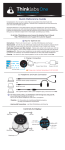
•Apply Probe with light, steady contact, not excessive pressure. (Step 5, See Over).
•The ds32a works best with direct skin contact. Avoid using through clothing.
•Experiment to find a preferred Volume level that optimizes clarity.
•Go to the website and READ the detailed User’s Manual and other information.
The Manual contain USEFUL TIPS for obtaining best results.
Troubleshooting
• No Power: (a) Check batteries are inserted correctly. (Step 1, See Over).
(b) Batteries need replacing.
• No Sound: (a) Increase Volume setting.
(b) Check headphone fit (See Over).
• Unexpected interference sounds:
(a) Radio station or electromagnetic pickup: Change position/location.
(b) Continuous Buzzing: Diaphragm loose - tighten Diaphragm Ring.
(c) Other noises: Possible dust, lint or moisture inside Probe Turn off device. In dust-free environment, unscrew Diaphragm ring.
Wipe inside surface of diaphragm and sensor with an alcohol swab.
Do not touch brass sensor plate or diaphragm with fingers.
Allow to dry/evaporate naturally, then close unit.
• Problem unsolved? Contact Thinklabs. See Over for contact information.
© 2005-2006 Thinklabs inc. ds32aumqr v2.1
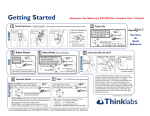
Control Panel
AMPLIFY
Rhythm :ds32a
BELL / DIAPHRAGM
Volume Control
behind Control Panel
(active when Blue LED
POWER
DIGITAL STETHOSCOPE
is On)
Power On Click to turn on
Power Off (auto or manual)
Shuts off automatically after 2 minutes*
OR Push & Hold until all LEDs light, Release
* time is programmable up to 5 minutes
Advanced Use - Preset and Save all your power-on Mode preferences
Program the ds32a to power up in most recent Modes, or in your preset configuration.
Recent Mode wakeup - Push+Hold Power key 5 secs, Red LED flashes slowly, Release.
Preset Modes - (1) Set ds32a in your preferred modes. (ALL Modes are memorized).
(2) Set auto shutoff time - Click the Power key the number of minutes
ds32a should stay on before auto shutoff (2, 3, 4, or 5 minutes).
(3) Push+Hold Power key >10 secs, Red LED flashes faster, Release.
http://www.thinklabsmedical.com/ds32a for detailed User’s Manual
and other information.
Thinklabs