1
User manual
System setting
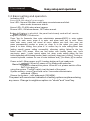
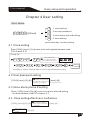
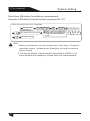
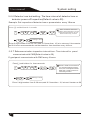
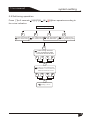
5.6.6 Detector loss test setting: The time interval of detector lose or
detector power-off Inspection(Default value is 00) .
Example: Set inspection of detector loss or power status every 18hours
Press [*] and hold on for 3 seconds
*
9 8 7 6 #
1 8
#
4 #
6 #
Enter 0-24hours interval on
detector loss inspection, 0 for not
inspect.Press back key to exit .
Press confirm key to save.
Setting is saved
Enter 2 digit number from 0 to 24 h, add 0 if lower than 10, ie to set every 9 hours enter
as 09 It is not recommended to set the detection time less than every 4 hours.
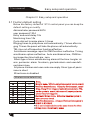
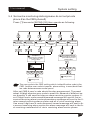
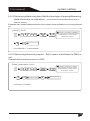
5 .6.7 Setcommunication inspection interval time : Time interval for panel
communicate with CMS(Default value is 00)
E.gset panel communicate with CMS every 4 hours.
Press[ * ] and hold on for three seconds
*
9 8 7 6 #
0 4
#
4 #
7 #
Enter 0 to 24 hours interval
on communicationin spection,0 for not inspect.Press
back key to exit .Press confirm key to save.
Setting is saved
Enter 2 digit number from 0-24hours,add 0 if lower than 10, ie to set 9 eneter as 09.
27