1
Table of Contents
Table of Contents............................................................................................................ iii
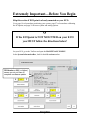
Extremely Important—Before You Begin ...................................................................... 5
Mounting the ECOpoint System on your ECO ............................................................... 7
Positioning the ECOpoint.............................................................................................. 14
Calibrate the ECOpoint ................................................................................................. 27
Calibrate Now....................................................................................................................................... 27
Eye Track Settings................................................................................................................................ 27
Calibration Settings .............................................................................................................................. 28
Other ECOpoint Access Method Menu Options ........................................................... 29
Eye Track Status................................................................................................................................... 29
Pause/Resume....................................................................................................................................... 31
Pointer Color ........................................................................................................................................ 31
Pointer Size........................................................................................................................................... 31
Pointer Type ......................................................................................................................................... 31
Acceptance Time .................................................................................................................................. 32
Auto Repeat.......................................................................................................................................... 32
Selection Type ...................................................................................................................................... 32
Predictive Selection .............................................................................................................................. 32
Highlight Keys...................................................................................................................................... 33
Windows Access Settings..................................................................................................................... 33
Windows Clicks.................................................................................................................................... 33
Mouse Sensitivity ................................................................................................................................. 33
Mouse Speed ........................................................................................................................................ 33
Magnify Windows Clicks..................................................................................................................... 34
Magnification Factor ............................................................................................................................ 34
Magnification Area............................................................................................................................... 34
Diagnostics Menu................................................................................................................................. 38
Practice .......................................................................................................................... 40
ECOpoint Manual
iii