1
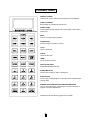
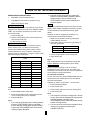
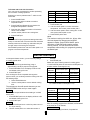
following steps, 1. Indicating the type of food placed into the oven by pressing ROAST pad up to 5 times. 2. Use the number pads to enter food weight within the range indicated in the charts below, 3. Touch START pad. During the cooking, beeps will be heard and cooking will automatically stop to let you turn food over for uniform cooking. Press ROAST 1. 2. Press BAKE Once 1. Chicken, turkey (whole) 2.5~7 lb Twice 2. Pork loin 2~3.5 lb 3 times 3. turkey breast 3~6 lb 4 times 4. beef eye of round 2~4 lb 5 times 5. Cornish hens SETTING Food Quantity Once 1. French fries 0.3~1 lb Twice 2. Frozen snack 2~3.5 lb 3 times 4 times 5 times 3. Brownies 4. Snack cake 5. Biscuits ײ ײ ײ ײ ײ ײ 8 ×8 ×2 8 ×8 ×2 8~10 (packages of convenience biscuits) When cooking takes place for items 3-4, the oven will firstly preheat to 350℉ before reminding you to place food into the oven. When cooking takes place for items 5, the oven will firstly preheat to 450℉ before reminding you to place food into the oven. If the preheat temperature reached, but food was not placed in soon after, the temperature in the oven will go down to a certain degree before it will restart the preheat program again. The preheating is necessary to ensure the cooking result. Quantity SETTING Food Press BAKE twice or up to 5 times, Press START pad. 1~6.5 lb COMPU BAKE For item 1, 1. Press BAKE pad once, 2. Use the number pads to enter food weight within the range indicated in the charts below, 3. Press START pad. For items 2-5 of the following food settings, OTHER CONVENIENT FEATURES OPERATING 1. Press STOP/CANCEL pad. You can restart the oven by pressing START pad. Touch STOP/CANCEL to erase all instructions. 2. Open the door. You can restart the oven by closing the door and pressing START pad. ADD TO COOKING TIME For non-preprogrammed cooking, anytime you can add to cooking time by pressing START pad. The cooking time increases in one minute increment. MINUTE TIMER The timer works independently as a reminder and the time countdown ends in beeping. 1. Press TIMER 2. Use the numeric pads to enter the time to be counted down. 3. Press START. CHILD PROOF LOCK The child proof lock prevents unsupervised operation by little children. To set the child proof lock: Press STOP/CANCEL pad for 1.5 seconds, then a beep will sound and the indicator light will come on. In the lock state, all pads are disabled. To cancel the child proof lock: Press STOP/CANCEL pad for 1.5 seconds, then a beep will sound and the indicator light will come off. NOTE: Oven stops operating when door is opened. AUTOMATIC PROTECTION MECHANISM Anytime in the operation of the oven, when the oven cavity temperature reaches 300°C, the oven automatically enters into self protection mode with one beeping every 1.5 sec until the temperature decreases and STOP/CANCEL is pressed to make the oven back to normal. During grill or combination cooking, when the temperature of oven cavity is lower then 40°C after TO STOP THE OVEN WHILE THE OVEN IS 10