1
MPG LEVEL 1
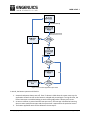
4. The state of the button is checked again by reading the GPIO line associated with the button. If
it is still low after the debounce time, then we conclude that a valid button press has occurred.
The button state is changed in memory so we know it is currently pressed, the current system
sys
time is logged so we know when th
the button press started, and the Boolean flag to indicate a
new button press has occurred is set. If the button state is high, that means it was not a valid
button press, so we go back to state 1.
5. The button application then polls the button every cycl
cycle to ensure that it is still pressed. The
particular button’ss interrupt is also still off at this time. As long as the button state does not
no
change, then this state is held.
6. If a pressed button iss released, then a new button debounce period is st
started.
7. When the debounce period has expired, the state of the button is checked. If it has truly been
released, then the state of the button is changed, the interrupt is re-enabled,
enabled, and we return to
state 1. Otherwise, the system returns to polling the button waiting for it to be released.
When there are no buttons pressed, the button application code executes quite quickly.
quickly As more
buttons get pressed, the application will need to do more work to monitor all of the buttons, though it is
still relatively
tively efficient in the way it is coded. The whole purpose of using an array to maintain all of the
button information was to minimize
inimize the amount of code that had to be written to check each button.
The same code is used to check each button with the var
varying
ying information managed with a loop index.
There are many ways that the button application could be written, and tthis
his design has advantages and
disadvantages. For the purpose of this chapter, you should be able to compare the flow chart with the
code in ButtonUpdate() and be comfortable with the way it works. The part left for you to write are the
updates that take place in each of the button interrupt service routines.
Add three lines of code to each button ISR to finish the button application:
1. Disable the interrupt
2. Set the button’ss debounce active flag to TRUE
3. Save the currentt 1ms system tick in the button’s data structure so the debounce period for the
button can be tracked.
Build and test your code to make sure you see the correct information being updated.. The entire
LGasButtons array of ButtonConfigType da
data
ta structures can be viewed in a watch window. Simple ad
LGasButtons to a watch window and IAR will automatically name and display the array elements. The
only thing you might need to do is change the display type for the Values of certain fields like
u32Location as it will default to decimal display that is not very helpful. One of the benefits of using
enumerated typess for things like ACTIVE_LOW or PRESSED is also shown here values for fields like
eCurrentState are shown in plain English (from the enum definition). Figure 9.5.2.2 shows a snapshot
from the test code.
notes_mpgl1_chapter9.docx
Release 1.0
Page 21 of 23