1
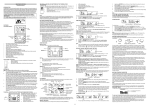
PROJECTION:
Battery Power: Press and release the SNOOZE/LIGHT button to show the
projection for 10 seconds.
Note: Projection will not display constantly when operating on battery power.
A/C Power: Projection is displayed constantly unless turned off.
• OFF: Hold the +/PROJ ON/OFF button to turn the projection OFF while
operating on A/C power.
• ON: Hold the +/PROJ ON/OFF button to turn the projection ON while operating
on A/C power.
• Rotate Projection: Press and release the PROJECTION button to rotate
projection image 90 degrees. Press and release the PROJECTION button again
to rotate another 90 degrees.
• Change Projection Mode: Hold, then release the PROJECTION button to
switch projection modes. Watch the projection image to view the changes.
o Time and Indoor Temperature: alternate every 5 seconds (default)
o Time: Hold and release PROJECTION button
o Outdoor Temperature: Hold and release PROJECTION button again
BACKLIGHT INTENSITY: Press and release the SNOOZE/LIGHT button to adjust
the brightness of the backlight:
A/C Power: the backlight is displayed constantly unless turned off.
• ON High intensity: The backlight is defaulted to HI when the adapter is in use.
• ON Low intensity: Press and release SNOOZE/LIGHT button once
• OFF: Press and release SNOOZE/LIGHT button
• ON: Press and release SNOOZE/LIGHT button again
• Note: When the adapter is NOT in use, the High/Low/On/Off features are not
available.
Battery Power: Press the SNOOZE/LIGHT button to display the backlight for 10
seconds.
LOW BATTERY:
• When this icon
appears replace the batteries and/or check the A/C adapter of
the Projection Alarm Clock.
CARE AND MAINTENANCE:
• Do Not Mix Old and New Batteries
• Do Not Mix Alkaline, Standard, Lithium or Rechargeable Batteries
• Do not expose the Projection Alarm Clock to extreme temperatures, vibration or
shock.
• Keep Projection Alarm Clock dry.
• Clean the Projection Alarm Clock with a soft damp cloth. Do not use solvents or
scouring agents.
• Improper use or unauthorized opening of housing will void the warranty.
• If the Projection Alarm Clock does not work properly, change the batteries and/or
check the a/c cord connection.
SPECIFICATIONS:
Indoor:
Temperature Range:
Accuracy:
Resolution :
From 0°C to 50°C (from +32°F to +122°F)
+/- 1°C (2°F)
0.1°
Power:
5-volt a/c power adapter (included)
Optional 2-AAA, IEC, LR3 batteries (not included)
Battery Life:
Over 12 months
USB Output:
0.5 Amp maximum current
Dimensions:
133 x 50 x 110 mm (5.23” L x 1.96” W x 4.33” H)
LIABILITY DISCLAIMER
USB CHARGE PORT:
The integrated USB charging port (on back) will charge your smart phone, camera
or other devices when the Projection Alarm Clock is plugged into a power outlet.
Note: This is a power output (charging) port only. This port will not supply power to
the Projection Alarm Clock.
• Connect your existing USB charging cord for
your external device to the USB charging
port on the back of the Projection Alarm
Clock to begin to charge. Charging times will
vary.
• Note: Check that your device will charge
with the USB cord it came with. Many
USB cords are for data transfer only, and
cannot be used for charging.
• Output: 0.5A maximum current USB.
• Do NOT overload USB port.
IMPORTANT: When operating on A/C power, the backlight, projection and USB
charging port will turn off while the Projection Alarm Clock searches for the DCF
signal, to avoid interference. The backlight and projection will return after the 2-10
minute search (which occurs during the late night or early morning hours). Then the
USB charging port will resume working.
• The electrical and electronic wastes contain hazardous substances. Disposal of
electronic waste in wild country and/or in unauthorized grounds strongly damages
the environment.
• Please contact your local or/and regional authorities to retrieve the addresses of
legal dumping grounds with selective collection.
• All electronic instruments must from now on be recycled. User shall take an
active part in the reuse, recycling and recovery of the electrical and electronic
waste.
• The unrestricted disposal of electronic waste may do harm on public health and
the quality of environment.
• As stated on the gift box and labeled on the product, reading the “User manual” is
highly recommended for the benefit of the user. This product must however not be
thrown in general rubbish collection points.
• The manufacturer and supplier cannot accept any responsibility for any incorrect
readings and any consequences that occur should an inaccurate reading take
place.
• This product is designed for use in the home only as indication of the temperature.
• This product is not to be used for medical purposes or for public information.
• The specifications of this product may change without prior notice.
• This product is not a toy. Keep out of the reach of children.
• No part of this manual may be reproduced without written authorization of the
manufacturer.
TEMPERATURE TREND ICONS:
The indoor temperature trend indicators are updated every 30 minutes. These
trends arrows represent temperature changes over the past three hours.
Temperature rising more than 2°F /1°C in the past three hours
Temperature has not changed more than 2°F /1°C in the past three
hours
Temperature falling more than 2°F /1°C in the past three hours
The temperature trend indicators are shown next to the indoor temperature
readings.
MOON PHASE:
The moon phase is based on the year, month and date set (manually or by the DCF
signal).
R&TTE Directive 1999/5/EC:
Summary of the Declaration of Conformity : We hereby declare that this wireless
transmission device does comply with the essential requirements of R&TTE
Directive 1999/5/EC.