1
Access Codes and Workstation Monitoring Module
One of the most important Butterfly Admin Interface modules is the module
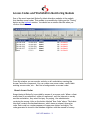
that handles access codes. This module is accessible by clicking on the "Timing"
button on the toplevel window. You should see a window like this when you
click on this button:
From this window you can monitor activity on all workstations running the
Access Controller component. You can create new access codes, credit/debit
existing access codes, etc... But first a backgrounder on access codes:
About Access Codes
Usage timing in Butterfly is provided by means of an access code. When a client
wants time on a workstation, either to read email, surf the Internet or merely
use the workstation, they must first pay. On paying, the administrator
receiving the money clicks on the button labeled "New Code" above. The Admin
Interface contacts the backend daemon, which issues a unique 6-character
code. Each code is a random sequence of uppercase letters and digits. The
code generated is stored in the database together with the amount of money
BNE USER MANUAL - 21