1
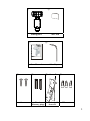
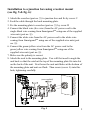
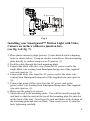
AC power cord
White
N
L
Green/Yellow
Black
Screw A
Fig. 6
Installing your Smartguard™ Motion Light with Video
Camera on surface without a junction box.
(see fig. 6 & fig. 7)
1. Place plastic masonry plugs (part no. ⑥) into desired surface aligning
holes as shown below. Using an electric screwdriver, fasten mounting
plate directly to surface using screws E (part no. ⑤).
2. Feed the cable through the back mounting plate.
3. Connect the black wire (live wire) from the AC power cord to the
single black wire coming from Smartguard using one of the supplied
wire nuts (part no. ⑧).
4. Connect the white wire from the AC power cord to the white wire
coming from Smartguard using one of the supplied wire nuts (part no
⑧).
5. Connect the green/yellow wire from the AC power cord to the
green/yellow wire coming from Smartguard using one of the supplied
wire nuts (part no. ⑧).
6. Make sure the polarity is correct.
7. Attach the unit to the mounting plate. You will first need to angle the
unit back so that the catch at the top of the mounting plate fits into slot
on the back of the unit. Next lower the unit until holes at the bottom of
the mounting plate and unit are flush. Then screw (screw A) into this
hole, tightening carefully.
6