1
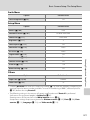
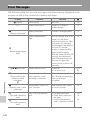
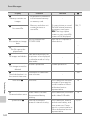
Error Messages
Problem
Memory card has not been
formatted for use in
COOLPIX S550.
Choose Yes and press k
to format card, or turn
camera off and replace
card.
19
N
Memory card is full.
• Choose smaller image
size.
• Delete pictures or sound
files.
• Insert new memory card.
• Remove memory card
and use internal
memory.
87
Out of memory.
P
Solution
A
Display
P
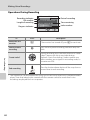
Card is not formatted.
Format card?
No
Yes
26, 66,
70
18
19
Format internal memory or
memory card.
117
Camera has run out of file
numbers.
• Insert new memory card.
• Format internal memory
or memory card.
18
117
Picture cannot be used for
welcome screen.
Pictures which are set as
16:9 (1920) on Image
mode setting and images
smaller than 320 × 240
edited by the crop or small
picture function are not
selectable.
51, 52,
87
Cannot copy picture.
Delete pictures from
destination.
102
P
Sound file cannot be
saved.
Camera has run out of file
numbers.
• Insert new memory card.
• Format internal memory
or memory card.
18
117
N
Cannot edit selected
picture.
Select picture that
supports D-Lighting,
Electronic VR, crop or small
picture.
48
N
Time out error while
Cannot record movie. recording movie.
Choose memory card with
faster write speed.
123
Image cannot be
modified.
Technical Notes
Error occurred while
recording picture.
Image cannot be
saved.
131