1
REI2
Single Starts Program
Doc: R2U_S_1079_001_E
Version: 1.07.9
Page 40 of 109
5 Group management
Initial configuration is for a maximum 200 groups with the possibility of inserting up to 20 choices.;
function 5.4 Groups structure: (see p.41) can be used to change the number of groups and choices.
The groups are used for the calculation of position in the ranking during timing, for the printing of
rankings and for the calculation of the starting order of subsequent runs.
The same athlete can be inserted into 10 groups. The group numbers do not have to be consecutive
but can be assigned as desired.
All group management is contained in the menu M 1 B
following instructions refer to this menu.
5.1
Group insertion/printing and the
Input/Modify groups
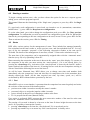
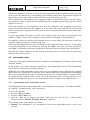
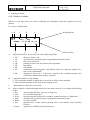
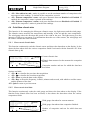
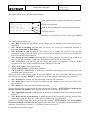
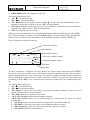
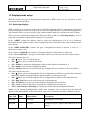
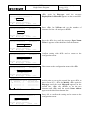
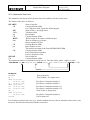
This function allows you to specify the composition of the single groups.
Group number.
Hh:mm:ss.d
GROUP N. 1 LAP 4
From N.
to N.
Choice N.
1
--------Choice N.
2
--------Choice N.
3
--------Choice N.
4
--------ENT=Modify ALT+ENT=Print ARR=Change Group
↑
↓
Clear
Group N. quit A
Group’s number of laps
Subgroup number (not editable).
Details of subgroup inserted.
Options available:
• <F1>
to scroll up the list of the choices available, within each group, towards choice N° 1.
The selected choice is indicated with the symbol next to it
• <F2> to scroll down the list towards choice with maximum number
• <F3> Delete deletes the content of the choice selected by the symbol • <F4> Group N. allows you to specify the group number (from 1 to 99) on which you intend to
work
• <F5> quit quits the function
• <ALT>+<F1> Choice makes it possible to choose between insertion of Double to enter the
minimum and maximum competitor numbers of the choices and Single to enter single
competitor numbers.
• <ALT>+<F3> Lap makes it possible to insert a different number of laps for each group. This
function is only active if the setting made in the choice Last relay lap (Lap>>Stop) (see chap.
12.1.5 on p. 69) is different from 0.
• <ENT> allows you to modify the values of the choice indicated
• <ALT+ENT> Print prints the composition of the groups
• <Arrow up > increases the group number
• <Arrow down > decreases the group number.
For example, suppose we want to define the following groups (categories):
Group 1
numbers from 1 to 10
number 15
numbers from 20 to28
Group 2
not used
Group 3
numbers from 40 to 50