1
Introduction
CORRECT is designed to ease the cost and benefit evaluations for determining optimal
alternative safety treatments to be applied to the highway system. CORRECT has been
built as an Excel Workbook into which multiple locations can be added and summarized.
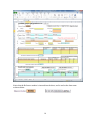
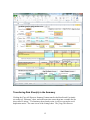
CORRECT opens a control panel sheet from which a number of commands can be initiated. These are divided into two broad classes: 1) editing of parameters and pick lists,
and 2) creation new analysis (CASE) sheet, and creating the summary.
The benefit computations are dependent upon the road classification (e.g. Federal, State,
County or Municipal) and whether the location under consideration is determined to be
Urban or Rural. For each combination of these classifications, a set of annual crash frequencies is used to derive the overall Benefit/Cost values and ratios. Each workbook can
contain multiple Candidate Analysis Site Evaluation (CASE) sheets that all utilize the
same basic parameters that are set up in a single Parameters sheet. CASE sheets essentially define the costs and benefits of alternative improvement scenarios at a given location. The Parameters sheet is used to set up the primary parameters that will be used for
all CASE sheets in the workbook.
Create a new file
It is generally necessary to create a new file of CASE sheets when making a new CORRECT application. To do this, copy the delivered file:
CORRECT_Template_<version>.xls
to a suitable location, and give it a meaningful name. Do NOT called it Template – give
it a name that is representative of the project funds you are allocating (e.g., “2011-HESAllocation”). Be sure to copy it as an Excel Macro Enabled Spreadsheet; if not, functionality will be lost.
Terminology. Each file (in Excel jargon, a workbook) can hold multiple CASE sheets.
Each CASE sheet will be in a separate worksheet within the workbook. Again, “worksheet” is the Excel name for a separate subdivision within their workbook. In this manual
these will generally be referenced as “CASE sheets” or just “sheets.”
The number of CASE sheets will be dependent on the number of locations under consideration. It is recommended that the total number of potential locations to be improved be
subdivided so that, for example, very large and very small projects are not considered
simultaneously within the same workbook. This assists in creating a better situation for
optimization, and it will also facilitate processing, since the more sheets in a single workbook, the slower the response time may become. A suggested target would be 20 to 30
CASE sheets per workbook. Further instructions are given in the next section.
Control Panel (Instructions sheet)
Note: “Instructions” is the name of the sheet containing the Control Panel.
3