1
SETTING UP THE TV
A-3
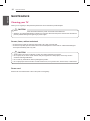
SETTING UP THE TV
Image shown may differ from your TV.
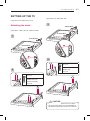
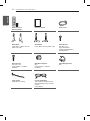
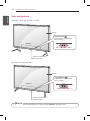
Attaching the stand
(Only LB56**-ZT / ZQ, LB62**-ZE)
1
A Stand Base
(Only LB55**, LB56**-ZE / ZC, LB62**-ZA / ZB)
B Stand Base
1
A Stand Base
B Stand Base
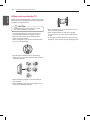
2
M4 x L14
2
4EA
(Only 32LB56**-ZT / ZQ,
32LB62**-ZE)
M4 x L20
M4 x L14
4EA
(Only 32LB55**,
32LB56**-ZE / ZC,
32LB62**-ZA / ZB)
M4 x L20
CAUTION
yy When attaching the stand to the TV set, place
the screen facing down on a cushioned table or
flat surface to protect the screen from scratches.