1
PL60/PL80 User Guide
2
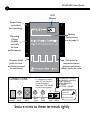
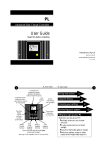
LCD
Display
Screw holes
(use these
for mounting)
Button
(instructions
are on page 5)
Mounting
Flange
(mount
vertically
for best
performance)
Expansion Socket
(under the cover see reference manual
for instructions)
Connection for
temperature sensor,
generator and battery
sensors (under the cover)
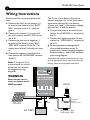
CONNECTIONS
The G Terminals are a pair
of voltage free contacts.
When ACTIVE they are
connected together.
When INACTIVE they are
not connected together.
+
-
-
+
WZS SOLAR BATTERY BATT.
CABLE NEG.
NEG.
POS.
G CONTACT 0.3A MAX
G CONTACT 0.3A MAX
TEMP SENSOR TEMP SENSOR +
B- SENSE
BATTERY + SENSE
-
+
SOL.
POS.
LOAD
POS. NEG.
Screws on side
of the lid
must be in place
during transport.
Secure wires to these terminals tightly