1
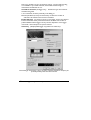
Memory Calculator Calculates the maximum time for which the logger
can collect data, given the sample interval, the number of probes, and the
logger’s memory size. The time available may be further limited by the level
of battery charge.
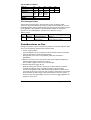
Battery Status The charge indicator gives both the current percentage of
full charge held by the logger battery, and a color-coded report:
GREEN Sufficient charge to perform a run.
YELLOW May be enough charge for a run, but battery getting low.
RED
Insufficient battery charge: recharge immediately.
The battery charge level will not be displayed if the logger is on charge: disconnect
the charger to verify battery status.
The logger’s nickel-metal-hydride batteries discharge slowly even when not
in use and will need charging if left for more than three weeks. With the
Datapaq 9000 logger a full charge can be completed in two hours; with the
XL logger a full charge will take one hour using the Computer Interface or
24 hours using the charger directly (see p. 16).
If in any doubt, abort the procedure by clicking ‘Cancel’, and recharge the
logger.
Trigger Mode Select here a means to start the logger recording data.
No Trigger Data-recording starts immediately the reset is complete and the
communications lead has been disconnected from the logger (or, if using
the XL logger, when the MemoryPaq is connected to the Transducer
Interface).
Start Button (Datapaq 9000 only) After reset, data-recording starts when
the logger’s green start button is pressed and held for 1 second.
Date and Time Data recording starts at a specified date and time. The
current date appears by default.
Rising Temperature Data-recording starts when the temperature of probe
no. 1 (or of any probe, if using the XL logger) rises to the specified value.
(If rising or falling temperature trigger mode is set, the logger records
data from the time it is disconnected from the PC – but, once the trigger
temperature has been reached, the logger keeps only a maximum of 60
data points before the trigger point and discards any others. For the XL
logger, the number of data points kept varies with the sample interval.)
Falling Temperature Data-recording starts when the temperature of probe
no. 1 reaches the specified value as it is falling.
3. After clicking OK, the logger is reset and a message box confirms the sample
interval and trigger mode you have set.
4. XL LOGGER
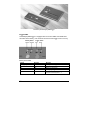
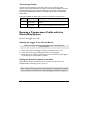
The MemoryPaq’s alphanumeric display and status LEDs indicate in the
following sequence:
OV EN T RA C K ER
Running a Temperature Profile
41