1
Command-Line Interface
nexti
7
Execute one instruction, stepping over procedures.
nexti [repeat]
Abbreviation: ni
repeat
The repeat argument specifies the number of instructions to single step. The
default is one instruction.
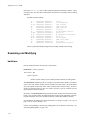
nexti executes a single machine instruction in each of the processes specified by the
qualifier, except that nexti steps over procedure calls and inlined procedures. See
“Inline Subprograms” on page 3-28.
This is very similar to next, except that next executes lines and nexti executes
individual instructions. See “next” on page 7-111.
This command completes only when all of the processes specified by the qualifier have
completed the single step or stopped for some other reason (like receiving a signal). See
“Signals” on page 3-14 for a discussion of the interactions between single-stepping and
signals.
nexti is interpreted relative to the current frame. See “Current Frame” on page 3-27.
That is, any lower frames are automatically finished before stepping.
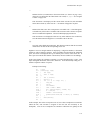
If an exception propagates to the current frame or a calling frame, then the nexti completes and execution is stopped at the beginning of the exception handler.
finish
7
Continue execution until the current function finishes.
finish
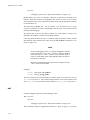
finish causes a process to continue execution until the current frame returns. This
happens in each process specified by the qualifier.
Note that this may cause the process to finish multiple procedures, depending on which
frame is the current frame. See “frame” on page 7-119. If the current frame is in the
context of a task, thread, LWP or thread process chosen by the select-context
command, execution continues until that task, thread, LWP or thread process completes
execution of that procedure, or until the process stops for some other reason. See
“Multithreaded Programs” on page 3-36.
In general, the exact action of this command is dependent on the language being
debugged.
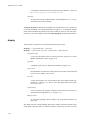
The finish command causes execution to leave a called procedure, so the output
includes the equivalent of a frame 0 command to show this.
7-113