1
Sony VAIO Desktop User Guide
Using your VAIO desktop
n N
20
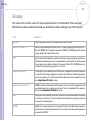
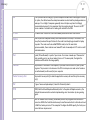
Keys
Descriptions
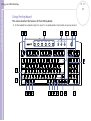
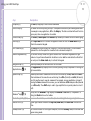
<Fn> combination keys (14)
These keys are used in combination with the <Fn> key to execute the commands depicted
within the box on the key.
<Fn> key (15)
The <Fn> key is used in combination with 5 other keys to execute certain commands.
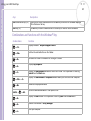
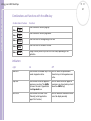
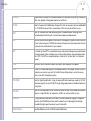
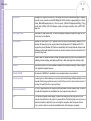
Combinations and functions with the Windows® key
Combinations
Displays Windows® Help and Support Centre.
+< F1>
Switches the selected button on the taskbar.
+ <Tab>
Refreshes the screen if a window is not closing as it should.
+ <D>
Displays My Computer.
+ <E>
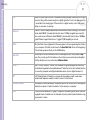
Displays the Search Results window to find a file or folder. This is equivalent to selecting
Search from the Start menu.
+ <F>
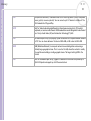
+ <Ctrl> + <F>
+ <R>
+ <U>
+ <L>
Displays the Search Results - Computers window where you can locate other computers.
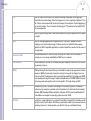
Minimises all displayed windows.
+ <M>
<Shift> +
Function
+ <M>
Returns all minimised windows to their previous size.
Displays the Run window. This is equivalent to selecting Run from the Start menu.
Launches the Windows ® Utility Manager.
Locks your computer.