1
Trane C.D.S. eLearning Series
Slide 6 TRACE 700: Single-Zone VAV Systems
variable‐speed fan control
minimum
airflow limit
supply fan airflow
supply‐air temperature setpoint
maximum SAT for heating
design SAT for cooling
design zone heating load
zone sensible load
design zone
cooling load
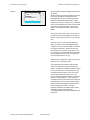
Slide 7 Modeling SZVAV in TRACE™ 700
Creates Rooms
1. Airflows Tab
• By default:
• Min Cooling Airflow set 30%
of supply airflow
• Max Heating Airflow = Min
Cooling Airflow
• To change min stop:
• Adjust Clg VAV min and Htg
VAV max
© 2014 Trane a business of Ingersoll Rand
All rights reserved.
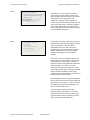
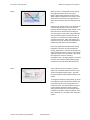
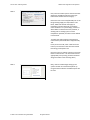
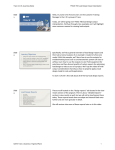
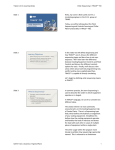
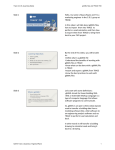
When the zone is at the design sensible cooling load (right hand side of chart), the system delivers 100% supply airflow to the zone at the design supply‐air temperature for cooling. As the load in the zone decreases, the supply airflow is decreased to maintain the room temperature set point. Eventually, the load decreases to the point where minimum airflow limit or min stop is reached (typically 30% of the design supply airflow). If the load continues to decrease after reaching min stop, the supply air temperature will gradually be reset upward to avoid overcooling the zone. At some point, no mechanical cooling is needed to maintain temperature. When this happens, the compressors turn off, and the zone temperature is allowed to float within the set deadband. If the zone temperature falls below the heating temperature set point, the zone will demand heating. When there is a demand for heating, the supply airflow will remain at the min stop and the supply air temperature is increased. If the supply air temperature reaches a maximum temperature limit , the supply airflow is increased to match space load until heating design supply conditions are met (left hand side of the chart). So let’s talk about how to model this system in TRACE 700. By default TRACE sets the min stop at 30% of the design supply airflow. This value can be overridden to meet requirements for your system. To change the minimum cooling airflow, go to the Create Rooms screen and select the Airflows Tab. Under VAV control, set the cooling VAV min to the desired value. The heating VAV max control is the maximum airflow that can be supplied during heating mode once the maximum supply temperature has been reached. By default, if this field is left blank, it is set equal to the cooling min airflow.