1
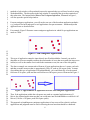
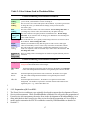
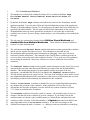
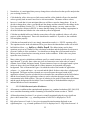
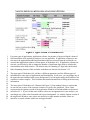
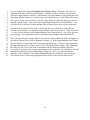
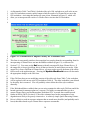
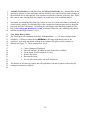
Table 2: Color Scheme Used in WorksheetMaker
General Formatting in Calculation Worksheets
Green
shading
Yellow
shading
This is a default value or a user specified a value. You can change these values as
you see fit but you should have a reason for doing so.
This is a source for a link in other parts of the workbook. If you have good reason
to change the value, you should note the change (with your reason) in the
“Revisions” page.
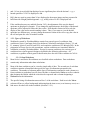
Blue
shading
Blue
shading blue
border
This cell is linked to another cell in the workbook. Do not change this value. If
you change any of these values, the workbook may not update correctly.
This cell is linked to a Program parameter in Worksheet A01. Do not change
this value. If you want the value to change, go to Worksheet A01 and change the
value in that worksheet.
Red Shading
This is a Results cell. It is typically a named range and serves as a link to cells in
the workbook. Do not change this value.
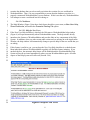
Indicates (for information only) that the typical of order of Lower and Upper
values is intentionally reversed. This is only used in the second (label) column.
The value in this cell is generated by a formula (the number that you see is the
result of an equation). This cell is linked only to other cells in the worksheet. Do
not change this value.
Purple
Shading
Italics, no
shading
Bold font on
gray
background
These are simply labels or headings that are shaded to separate different parts of a
worksheet
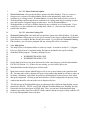
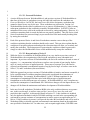
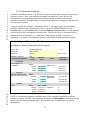
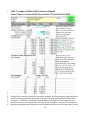
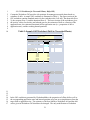
General Formatting in Calculation Worksheets
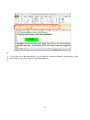
HQ ≥ 2
HQ > 1 but
<2
For hazard quotient greater than 2, the number is in bold font with a red
background and rounded to the nearest integer.
For hazard quotient greater than 1 but less than two, the number is in bold font
with a white background and rounded to one significant place after the decimal.
HQ ≥ 0.1
but <1
For hazard quotient greater than 0.1 but less than one, the number is in regular
font with a white background and rounded to one significant place after the
decimal.
HQ < 0.1
For hazard quotient less than 0.1, the number is in regular font with a white
background. The number is expressed in scientific notation and rounded to one
significant place -- e.g., 2E-02 rather than 0.02.
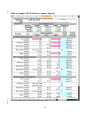
1
2
3
4
5
6
7
8
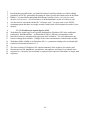
3.1.2. Preparation of EA’s or EIS’s
The Forest Service worksheets were originally developed to support the development of Forest
Service risk assessments. While WorksheetMaker workbooks are still used in the preparation of
Forest Service risk assessments, the major focus in the development of WorksheetMaker 6 is to
allow individuals in the Forest Service who are involved in the preparation or EAs or EISs to
modify and/or customize the EXCEL workbooks created by WorksheetMaker as detailed in
Section 3.3.
17