1
Index
Introduction
5
Environment
7
Safety requirements
9
Caution servicing
Chapter 1: Pin connections and connectors
Attention
Chapter 2: Overview front and rear panel
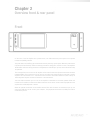
Front description
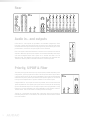
Rear description
Audio in- and outputs
Priority, S/PDIF & Fiber link inputs
Peripheral interfaces
Control ports
9
11
11
13
13
14
14
14
15
15
Chapter 3: Wire up the system
15
Chapter 4: R2 Quick start guide
16
Connecting the R2
Configuring the R2
Chapter 5: User interface & configuration
Open the user interface
Login screen
Main screen
Zone settings
Sound settings
Test signals
Configuration screen
Digital input setection
Timer settings
Time settings
Network settings
Paging settings
Priority settings
Wall panel settings
R2 Address settings
Fiber settings
Amplifier bridging
Password settings
Factory settings
16
17
19
19
19
20
21
22
23
24
24
25
26
27
27
28
29
30
31
32
32
33
3