1
CONTENTS
- Introduction
3
- e-Mintza applications
4
- Minimal hardware requirements
4
For Windows download
For MacOS download
For Android download
4
5
5
- Using e-Mintza
6
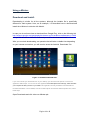
Download and Install
6
Opening e-Mintza
10
Exiting e-Mintza
10
- Supporting Person Tools
11
1. TOP MENU BUTTONS
13
1.1. GENERAL EDITING GUIDELINES:
13
Buttons START and AUTHOR
13
Buttons YES, NO and EXIT
14
1.1.1. Title of the button
1.1.2. Image of the button
1.1.3. Sound of the button
1.1.4. Video of the button
1.1.5. Color of the icon
1.2. DRAG AND DROP
14
15
19
24
27
28
1.3. ABOUT ME
30
1.4. SCHEDULE
31
2. WHITEBOARD
36
3. COLOR OF THE SCREEN AND SENSITIVITY
37
4. CATEGORIES AND ITS ELEMENTS
37
4.1. Introduction to categories and personalization possibilities
37
4.2. Deciding the number of categories
40
4.3. Editing a category and its elements
40
4.3.1. Space for editing categories
4.3.1.1. Title of a category
4.3.1.2. Image of the category button
4.3.1.3. Color of the category
40
41
41
41
4.3.2. Understanding elements and their editing
41
4.3.2.1. Search
4.3.2.2. Editing
4.3.2.3. New
4.3.2.4. Activate and deactivate
4.3.2.5. Ascending and Descending elements
4.3.2.6. Associated elements
42
42
43
43
44
44
- Final remarks
47
- Acknowledgements
48
Página 2 de 48