1
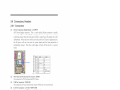
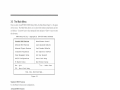
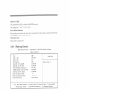
Parallel Port Mode
SPP
: Standard Parallel Port
EPP
2 Enhanced Parallel Port
ECP
: Extended Capability Port
SPP/"EPP/ECP.v'ECP+EPP
To operate the onboard parallel port as Standard Parallel Port only, choose “SPP.“ To operate the
onboard parallel pen in the EFF modes simultaneously, choose “EPP.“ By choosing "ECP". the
onboard parallel port will operate in ECP mode only. Choosing "ECP4-EPP" will allow the
onboard parallel port to support both the ECP and EPP modes simultaneously. The ECP mode
has to use the DMA channel, so choose the onboard parallel port with the EC P feature.
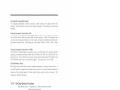
After
selecting it, the following message will appear: “EC P Mode Use DMA” at this time, the user can
choose between DMA channels 3 to 1. The onboard parallel port is EPP Spec. compliant, so after
the user chooses the onboard parallel port with the EPP function, the following message will be
displayed on the screen: “EPP Mode Select.“ At this time either EPP 1.7 spec. or EPP 1.9 spec.
can be chosen.
3-8
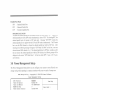
Power Management Setup
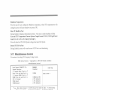
The Power Management Setup allows you to configure your system to most effectively save
energy saving while operating in a manner consistent with your own style of computer use.
CMOS Setup Utility - Copyrightlcl 1984-2004 Award Software
Power Management Setup
ACPI Function
Video Off Option
Video off Method
Enabled
Always Off
V/H SYNC+B1ank
M°°E“ "59 IRQ
Power Button Function
State After Power Failure
3
Instant-Off
Off
> Wake Up Events
Item Help
Menu Level >
Press Enter
Ti—++— Move Enter:Select +/-/PU/PD:Va1ue F10:Save ESC:Exit F1:Genera1 Help
F5:Previous Values
F6:Optimized Defaults
F7:Standard Defaults
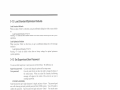
ACPI Function
This item allows you to Enabled/Disabled the Advanced Configuration and Power Management
(ACPI). The settings are Enabled and Disabled.
Video Off Option
This determines the manner in which the monitor is blanked. The choice are Suspend —> off, All
Modes —> Off, and Always On.
Video Off Method
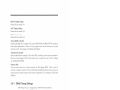
This determines the manner in which the monitor is blanked.
DPMS (default)
Initial display power management signaling.
Blank Screen
V/H SYNC+Blank
This option only writes blanks to the video buffer.
This selection will cause the system to turn off the vertical and
horizontal synchronization ports and write blanks to the video buffer.
29