1
01GB00DVA9861.book Page 61 Friday, December 2, 2005 6:18 PM
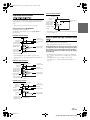
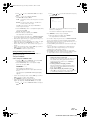
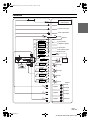
System Example
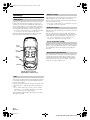
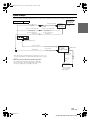
Connect the Ai-NET compatible digital audio processor (Fiber optic compatible) and touch panel compatible monitor/changer.
System switch
Touch panel
compatible monitor
(sold separately)
EQ/DIV
Video output Lead
(Yellow)
Video input terminal
RCA Extension cable (video)
(Included)
Remote control input Lead
(White/Brown)
Remote control output Lead
Monitor control Lead
(White/Pink)
Monitor control Lead
(White/Pink)
Touch panel
compatible
monitor box
(sold separately)
(White/Brown)
To Digital output terminal
Fiber optic Cable
Fiber optic input terminal
(for head unit)
Ai-NET Cable
Ai-NET compatible digital
audio processor
(sold separately)
(Fiber digital compatible)
Ai-NET Cable
Ai-NET output terminal
• When the fiber optic compatible product is connected, it is necessary to set
the mode of this unit. Refer to “Setting the Digital Output” (page 25) and set
to ON.
Please observe the following when using Fiber Optic Cable.
• Be careful not to bend the Fiber Optic Cable at a sharp angle.
• Do not coil the Fiber Optic Cable smaller than a 30 mm radius.
• Do not place anything on top of the Fiber Optic Cable.
Fiber optic
input terminal
(for changer)
*
Fiber optic
cable
Ai-NET compatible CD
changer (sold separately)
* Only connect fiber
optic compatible
CD changer
61-EN
01GB06DVA9861.fm
ALPINE DVA-9861E 68-04123Z63-A (EN)