1
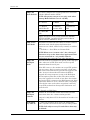
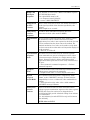
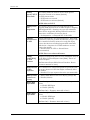
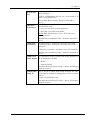
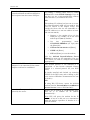
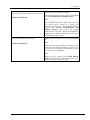
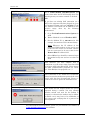
Table of Contents 1. Getting Started ............................................................................................... 1 1.1 Install ACE .................................................................................................... 1 1.2 Modem Configuration Wizard....................................................................... 2 2. Using ACE ........................................................................................................ 7 2.1 Minimized View............................................................................................. 7 2.2 Status Screen................................................................................................. 8 2.2.1 CDPD Tab ................................................................................................................ 8 2.2.2 GPS Tab.................................................................................................................. 10 2.2.3 Stats Tab ................................................................................................................ 11 2.3 Tools Menu .................................................................................................. 13 2.3.1 Communication Options........................................................................................ 14 2.4 Multiple Instances of ACE .......................................................................... 15 2.5 Modem Password......................................................................................... 17 2.6 Configuration Tabs...................................................................................... 17 2.6.1 Changing Modem Parameters .............................................................................. 19 2.6.2 Configuration Screen - CDPD Tab........................................................................ 20 2.6.3 Configuration Screen - Connection Tab ............................................................... 21 2.6.4 Configuration Screen - COM Port Tab ................................................................. 28 2.6.5 Configuration Screen - Security Tab .................................................................... 28 2.6.6 Configuration Screen - Modbus Tab ..................................................................... 29 2.6.7 Configuration Screen - PinPoint Tab ................................................................... 30 2.6.8 Configuration Screen - Monitor Tab..................................................................... 33 2.7 Templates .................................................................................................... 34 3. Troubleshooting............................................................................................ 36 4. More Information ......................................................................................... 44 Copyright 2002 AirLink Communications, Inc. All Rights Reserved