1
3.3 Peel-off Function (Not available for 243E series printer)
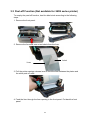
To employ the peel-off function, load the label stock according to the following
steps.
1. Remove the front panel.
2. Remove the foremost one or two labels from the liner.
Label
Liner
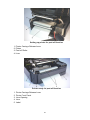
3 .Pull the printer carriage release lever to feed the liner between the platen and
the white peel-off roller.
4. Feed the liner through the liner opening in the front panel. Put back the front
panel.
19