1
CAM output: ncdump
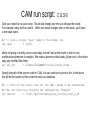
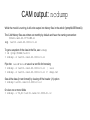
While the model is running, it will write output into history files in the wrkdir (/ptmp/$USER/test01)
The CAM history files are written out monthly by default and have the naming convention:
$CASE.cam2.h0.YYYY-MM.nc
e.g. test01.cam2.h0.0000-01.nc
To get a snapshot of the data in the file, use ncdump
% cd /ptmp/$USER/test01
% ncdump -h test01.cam2.h0.0000-01.nc
Pipe into less or more or save in a text file for browsing
% ncdump -h test01.cam2.h0.0000-01.nc | less
% ncdump -h test01.cam2.h0.0000-01.nc >! dump.txt
See all the data (in text format!) by leaving off the header (-h) option
% ncdump test01.cam2.h0.0000-01.nc
Or view one or more fields
% ncdump -v TS,PS test01.cam2.h0.0000-01.nc