1
Installing from IBASIC
This procedure assumes that you have the optional IBASIC installed in the
Command Module, and that the disk drive that will contain your AUTOST program
is at GPIB address 0 (zero). This procedure will not work correctly if your disk
drive is at any other GPIB address.
NOTE
If you wish to see the messages that the installation program generates, you need to
have a terminal connected to the IBASIC display port, and you must press the
IBASIC function key once IBASIC has loaded.
System Setup
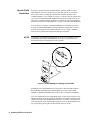
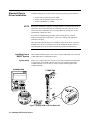
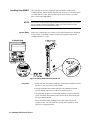
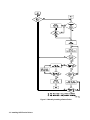
Set the "Sys Control/Talk Listen" switch on your Agilent E1300/E1301 Mainframe
to "Sys Control" or the GPIB Controller switch on your Agilent E1405/E1406
Command Module to 1 or ON.
E1300B/E1301B
Figure 4. Setting GPIB Controller Mode ON
Procedure
1. Put the LIF disk or the MS-DOS disk into your disk drive and make sure that
this drive is your current drive and is writeable.
2. Turn the mainframe OFF and then ON again. Once IBASIC has loaded,
press the IBASIC function key so that you can watch progress.
3. The installation program will create RAM partitions if required, reboot the
system if required, and install the required device driver files from the disk
into the Command Module.
Errors encountered while installing will be reported and will cause the
program to abort. You will get an error message with explanation, and in
most cases a suggested solution.
12 Installing SCPI Device Drivers