1
••
••
••
••
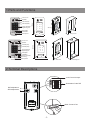
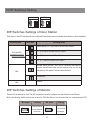
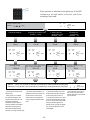
Lock Control Jumper: To select the lock type: see section 5
Doorstation Code DIP: Total 4 door stations can be supported,see section 6
MIC: Adjust the volume of Microphone
SPK: Adjust the volume of Speaker
••
••
••
••
••
Main Connect Port: To connect the bus line and the electronic locks.
BUS: Connect to the bus line, no polarity.
PL: External lock power input, connect to the power positive(power +).
S1+, S2+: Lock power(+) output, to connect 2 locks.
S-: Lock power(-) output, connect to the power(-) input of locks(only when using the camera to
power the locks, if using the external power supply for the locks, the S- will not be connected).
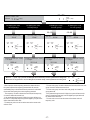
3.Door Station Mounting
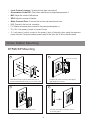
DT596/KP Mounting
1
2
adjust camera angle
Drill holes in the wall to match the size of
screws and attach the rainy cover to the wall.
Connect the cable correctly and adjust
right angle for camera
3
4
Attach the panel to the rainy cover
Use the screwdriver and the screw
to fix the panel
-2-