1
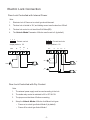
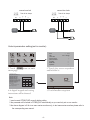
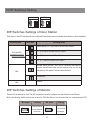
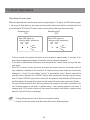
7.Unlock Operations Unlocking of user code When the registered user code has been input using the keypad (1~12 digits), the LED indicator (group 1: red, group 2: blue) lights up, the buzzer sounds,and the electric door strike is unlocked.(note that you should press "#" button(if "#" button is set to confirm button) after input the unlock code) Example:group 1 2011 Example:group 2 2012 Red LED lights up (during relay1 operation) (red) ON Blue LED lights up (during relay2 operation) (blue) OFF (red) OFF (blue) ON Beep+ Beep+ •• The time interval during which the button must be pressed is approximately 10 seconds. If the time interval exceeds approximately 10 seconds, the input value will be cleared. •• If you make a mistake when inputting the user code,press the" cancel" button and input the user code again. •• When the "Lockout" function has been activated, the release function is forbidden and the input operation is disabled for 60 seconds if 10 times incorrect access codes are continuously attempted. ( "Lockout" function:When "Lockout" is activated,the relay 2 doesn't respond the second lock but responds the LOCKOUT function.After continuously inputing incorrect access code 10 times,LOCKOUT output and the relay 2 will be closed for 60 seconds,the LED-relay 2 will be illuminated for 60 seconds) During this time,the buzzer will continuously sound about 8 times. •• You can activate the electric door strike by pressing the request to exit button connected to the unit. Pressing request to exit button 1 releases relay 1, and pressing request to exit button 2 releases relay 2.(The unlock function will work when the request to exit button is pushed, even while the "Lockout" function is operating.) 1. During calling,pressing "cancel" button can cancel the calling 2. If input the incorrect access code,the buzzer will sound of beep,beep,beep -18-