1
User Manual
M-Bus Wireless / Modbus Slave
Document code: MN67082_ENG
Revision 1.002
Page 21 of 42
Industrial Electronic Devices
SECTION NODES (WM-BUS NODES):
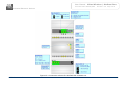
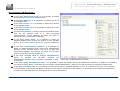
In the field “Manufacturer ID” it is necessary to define
the Manufacturer ID of the wM-Bus node.
In the field “Address” it is necessary to define the ID of
the wM-Bus node.
If the field “Version” it is necessary to define the version
of the wM-Bus node.
In the field “Device Type” it is possible to define the Type
of the wM-Bus node.
The field “Key Enable” is used to decode the M-Bus frame
sent by the wM-Bus node if it uses encrypted
communication. In the following 16 fields, you have to
specify the key to decode the message.
In the field “Node State” it is possible to insert an
address Modbus that contain the Status of the wM-Bus
device. If you don’t need to know this, put this register at
0.
In the field “Identification Number” it is possible to
insert an address Modbus that contain the Identification
Number of the wM-Bus device. You have to read two
consecutive registers for knowing the value. If you don’t
need to know this, put this register at 0.
If the field “Convert BCD in Integer Identification
Num.” is checked
the Converter converts the
Identification Number that is normally expressed in BCD
in a Integer.
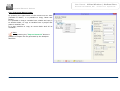
Figure 4b: “M-Bus Network” window
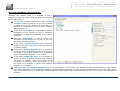
In the field “Swap Identification Num.” it is possible to select the swap mode of the Identification Number. If swap isn’t necessary
you have to select “None”; otherwise see the section “Swap Identification” (page 32) of this document for select the swap mode.
In the field “Variables List” it is necessary to select which type of variables definition to use. If is selected “By Type” it is necessary
to fill all fields, in the section Variables, with the correct values; otherwise if “By Position” is selected you can insert the progressive
number of the variable that you need (page 26 for more information).
ADFweb.com S.r.l.